CPU-Only Inference for Local AI on Older Hardware
Quantization shrinks models to run smoothly on ordinary laptop and desktop processors.

Until recently, the standard advice was GPU-only: CPUs were considered too slow for anything beyond toy models. That advice is now out of date, and the reason has nothing to do with CPUs getting faster. Google researcher David Patterson's 2026 paper confirms memory, not compute, is the irreducible constraint. What changed is the models themselves, through a technique called quantization, which shrinks how much memory a model needs and how much work the processor has to do to run it.
The size of that shift is easy to understate. A full-precision model that crawled on a CPU, too slow to hold a conversation with, becomes fast enough for real back-and-forth once it's aggressively quantized. A February 2026 TechRxiv preprint by Sciammarelli found that on CPU-only hardware, 4-bit quantization gave a large jump in inference throughput for smaller models over 8-bit versions, while keeping the RAM footprint under 1 GB. That's real-time AI response on an ordinary processor, no graphics card involved. On an AMD Ryzen 7 5800HS, the Q4_K_M quantized version of a small model ran roughly 18× faster than the full-precision version, with RAM dropping by over 90%.
This is a story about models shrinking to fit what CPUs can already do. That's genuinely useful news for anyone sitting on a laptop or desktop bought years ago. But it also means the decisions that used to not matter much, like which quantization level to pick or how much RAM a given model actually needs, now shape whether the experience feels smooth or unusable.
The one constraint that governs everything: memory bandwidth
CPU inference speed comes down almost entirely to how fast the processor can pull model weights out of RAM. Core count doesn't decide it. Clock speed doesn't decide it. Raw compute power doesn't decide it. Memory bandwidth does, and it governs nearly every recommendation in this guide.
Producing each token means reading the model's entire weight matrix out of RAM, and the speed of that read, measured in gigabytes per second, sets the hard ceiling on tokens per second. A processor with brilliant math units and a narrow memory pipe still waits on the pipe.
This produces a result that trips people up: a dual-socket Xeon server running older, slower DDR4 memory can outperform a newer desktop running faster DDR5, simply because the Xeon has more memory channels feeding it data at once. Total bandwidth wins over per-channel speed. A machine that looks outdated on paper, clocked lower, running last-generation memory, can beat a shinier one if it moves more data per second in aggregate.
Bandwidth isn't the only factor, just the dominant one. SIMD instructions, the AVX2 and AVX-512 instruction sets built into modern chips, speed up the matrix math once the data has already arrived. Most processors from 2015 onward carry AVX2, and AVX-512, present in some Intel chips and AMD's Zen 4 generation, adds a further, measurable gain on top of that. But that math only runs on data that's already made it out of RAM, so it improves what bandwidth allows rather than replacing it.
Compute raced ahead. Memory didn't keep up, and that gap makes bandwidth the bottleneck today. The pinggy.io 2026 hardware guide finds the same dynamic at the high end: an RTX 4090's advantage over a Mac Studio traces back to bandwidth differences, not raw teraflops. That logic scales down to a CPU-only desktop just as well.
So before asking how many cores a machine has, ask how many memory channels it has and what its total bandwidth adds up to. That single number predicts performance far better than anything on a spec sheet's front page.
Privacy, cost, and air-gapped environments make CPU inference worth the speed trade-off
CPU inference is slower than GPU inference. For a specific set of situations, that trade-off is worth making, or doesn't even register as a cost. The benefits are structural reasons certain workloads belong on a CPU in the first place.
Privacy and regulatory compliance top that list. When inference runs locally, prompts and outputs never leave the machine to reach a third-party API. That matters directly for healthcare work bound by HIPAA, legal work protected by attorney-client privilege, financial services bound by GLBA or GDPR, and any workflow touching proprietary internal data that shouldn't sit on someone else's server.
Air-gapped environments make the case even more starkly. Manufacturing floors, secure government facilities, and research labs with data isolation requirements often have no network connection to route a request through. Local CPU inference is the only option available there.
Cost adds a third argument, particularly at scale. Crewdle.com's analysis found local inference runs roughly 18 times cheaper per token than cloud APIs at enterprise volumes, with the hardware paying for itself within weeks. For an individual running models on a machine they already own, the marginal cost approaches zero.
Batch and asynchronous work rounds out the list: document processing, log analysis, offline summarization, anything where nobody is staring at a blinking cursor waiting for a reply. CPU speeds cause no friction there, because the task was never racing a clock.
That said, this isn't a fit for everything, and being honest about where it fails matters as much as celebrating where it works. Real-time interactive chat that needs sub-second responses struggles on CPU. Serving multiple users at once struggles too, since llama.cpp's time-to-first-token degrades sharply once several requests stack up concurrently, and fine-tuning is likewise a poor fit. At current speeds, CPU-only inference works best as a single-user technology, and setting that limit early saves a lot of wasted setup time.
Quantization levels, RAM requirements, and quality trade-offs
Once a use case clears the filter above, the next decision carries more weight than any other in a CPU-only setup: which quantization level to run. Q4_K_M has become the consensus pick for most people, but the reason takes a bit of unpacking, because every step down in precision trades something away.
Start with the format. GGUF has become the standard way to package quantized models for local inference, and it's natively supported across llama.cpp, Ollama, LM Studio, GPT4All, Jan, and koboldcpp. Tens of thousands of GGUF checkpoints already sit on Hugging Face, covering nearly every open model worth running.
Quantization levels trade file size against quality, and the relationship isn't linear. Dropping from 16-bit precision down to 8-bit roughly halves the size with a quality hit most people never notice. Dropping further to 4-bit, specifically the Q4_K_M variant, cuts size again while staying remarkably close to full quality. Most users can't tell the difference in normal use.
Multiply parameter count in billions by 0.6 to get the approximate Q4_K_M RAM requirement in GB, a shortcut offered by pinggy.io. It's a back-of-envelope number, not a precise spec, but close enough to plan around.
Context window size adds to that baseline, and it adds more than people expect. Longer context windows hold more text in memory at once, piling RAM usage on top of the model weights themselves. Popularai.org's July 2026 guidance recommends starting with a modest context size on CPU and expanding it only for tasks that actually need the extra room, since very large contexts can inflate memory use substantially.
Q4_K_M earns its spot as the default pick for a second reason beyond size: it behaves better in cache than Q8_0, meaning reads off RAM move faster, which stacks directly on top of the bandwidth advantage covered earlier. Smaller files and faster reads point in the same direction, which is part of why this particular quantization level became the default rather than a compromise.
Matching RAM tier to model size on CPU
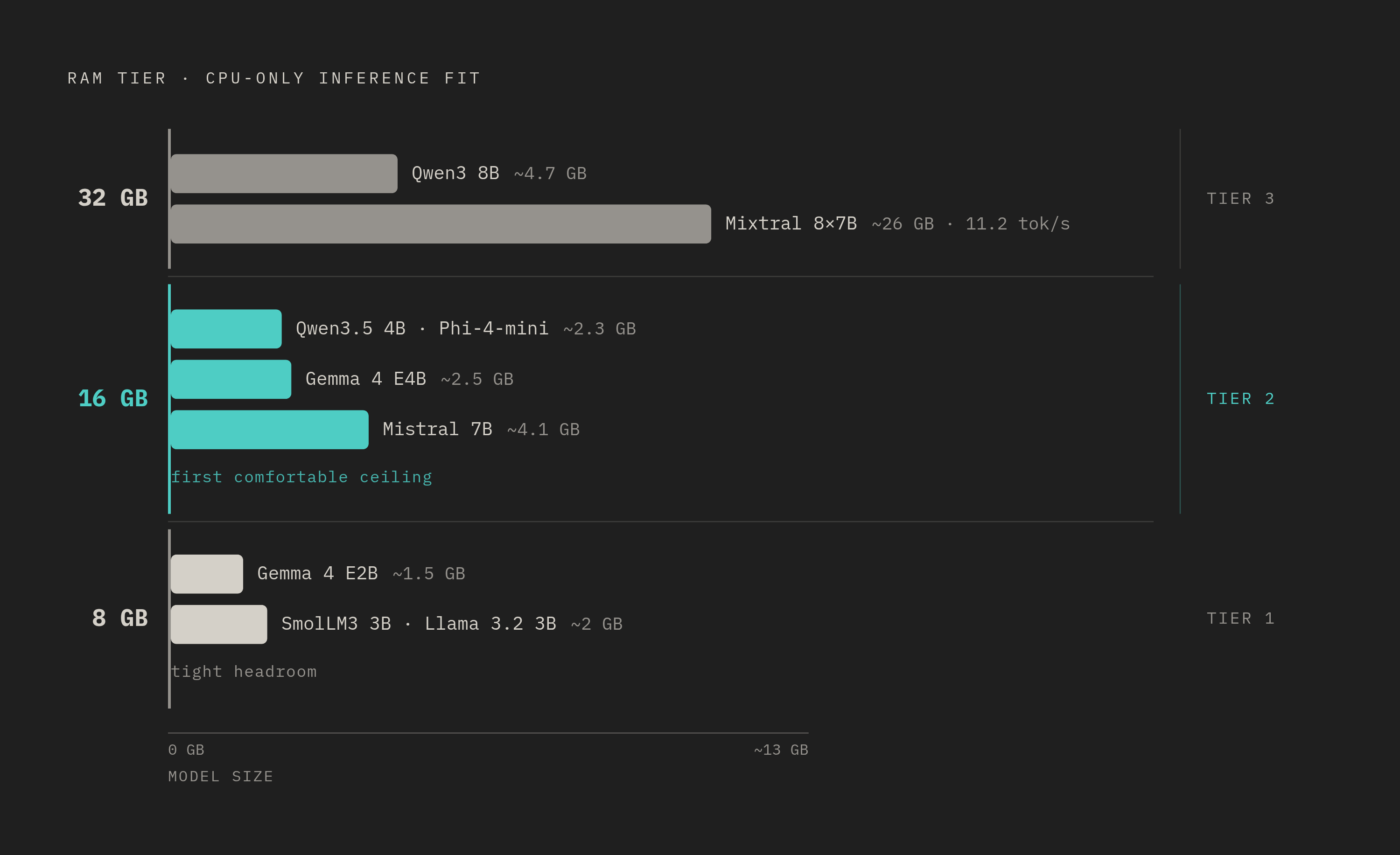
RAM sets a hard ceiling on which models are worth attempting at all, and for CPU-only inference on hardware that isn't brand new, the useful range runs from 8 GB up through 32 GB. Each tier opens up a different class of model, so locate where a given machine actually sits.
A 7B model can technically load, but it leaves almost no headroom for the OS and context.
At 16 GB, the range opens up considerably, and this is where CPU-only inference starts to feel genuinely comfortable. Models from 4B to 7B run smoothly at Q4_K_M. A 7B model is possible but leaves almost no headroom for the OS and context.
At 32 GB, capable mid-range models open up at Q4_K_M for capable CPU desktops. Mixtral 8x7B, a mixture-of-experts model that activates only part of its parameters per token, ran here: a high-end Ryzen chip pushed it to 11.2 tokens per second in geniustechlab.com's testing.
Popularai.org's general sizing guidance lines up with these tiers closely. Models in the 1B to 2B range run fast but stumble on reasoning tasks. The 3B to 4B range is the real sweet spot for CPU-only setups. Anything above 20B is best treated as a background or batch job rather than something to sit and wait on.
One caveat matters enough to repeat: RAM capacity alone doesn't guarantee speed. A machine with 32 GB of slow, single-channel RAM can underperform one with just 16 GB running dual-channel, because bandwidth, not capacity, governs how fast tokens come out. overchat.ai confirms 16 GB as the system RAM minimum, with 32 GB recommended, for running local LLMs. Sixteen gigabytes gets smaller quantized models running at Q4 without trouble. Thirty-two gives room to grow into bigger ones.
The specific models worth running on CPU in 2026, by use case
Quantization level and RAM tier narrow the field. What's left is choosing an actual model, and here architecture matters almost as much as quantization does. A handful of models built from the ground up for efficiency, rather than simply scaled down from larger ones, consistently punch above their parameter count on CPU.
For most people running a 16 GB machine, Qwen3.5 4B at Q4_K_M is the broadest, most reliable pick and the best overall choice for most CPU-only users. It handles general chat, summarization, light coding, JSON extraction, and drafting without complaint, and it's available with a single command through Ollama. If a reader wants one model to start with and stop deliberating, this is it.
On an 8 GB machine, where every gigabyte counts, Gemma 4 E2B is the strongest fit for speed. At roughly 1.5 GB, it runs fluidly on a modern i7 or Ryzen chip and happens to support both text and image input, a useful bonus rather than the main selling point. Confirm that the specific runner in use supports the exact quantization variant before committing, since support varies across tools.
For reasoning and structured output work, Phi-4-mini-instruct stands out. At around 2.3 GB, it runs quickly on modern Intel chips with AVX-512, and Microsoft's own model card describes it as built for memory-constrained, latency-bound environments, with particular strength in reasoning, math, logic, instruction following, and function calling. The model card lists a large maximum context length, but CPU users should cap that well below the listed maximum in practice, given how much context inflates RAM use.
For older or weaker machines that still need something usable, SmolLM3 3B and Llama 3.2 3B both run around 2 GB and run noticeably faster than their 4B counterparts. Neither is the strongest reasoner on this list, but both offer a solid balance of quality and speed, and either makes a sound fallback when a larger model starts to feel sluggish.
For 16 GB users willing to trade speed for stronger output, try Gemma 4 E4B, Mistral 7B, and Qwen3 8B at Q4_K_M. Qwen3 8B in particular only manages a few tokens per second on CPU, but it scores well on coding benchmarks, which makes the wait worthwhile for code-heavy work.
For reasoning-heavy tasks where speed matters less than depth, a distilled 7B reasoning model, around 5 GB at Q4_K_M, offers genuine chain-of-thought reasoning. It runs slowly enough that it suits batch or asynchronous use rather than live conversation, which lines up with the batch-workload case made earlier in this guide.
Picking among these means matching a model's size and design to the RAM tier and bandwidth already sitting on the machine in front of you. Get that match right, and a laptop bought years ago starts answering questions at a pace that feels, for the first time, worth the wait.