RAM and Storage Requirements for Local Model Serving
Calculate model size and context demands before buying hardware to avoid costly mistakes.
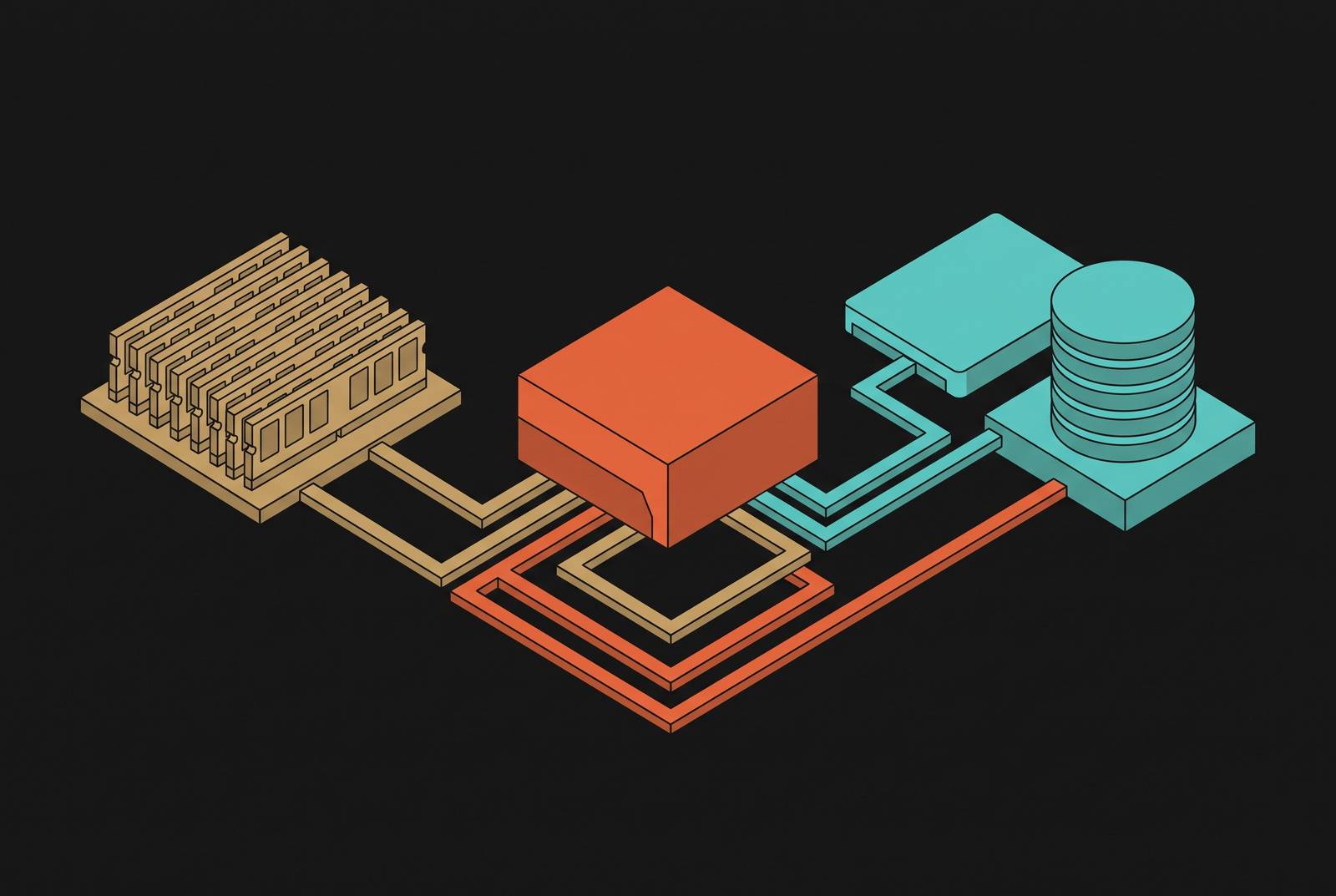
Running a local model comes down to arithmetic about what fits. Most people who hit an out-of-memory error or watch their setup crawl made the same mistake: they matched model names to hardware intuitively, instead of calculating what actually fits. Three separate memory buckets decide whether a model runs at all: the weights, the KV cache, and runtime overhead, and each one grows by its own rules. Skipping the math raises the cost later, appearing as a GPU that can't do the job you bought it for, hours lost debugging a crash that was never a bug, or a production system that works fine in testing and folds the moment someone sends a long prompt. The rest of this piece walks through the formula piece by piece, so hardware gets picked after the math, not before it.
How weight memory is calculated from parameter count and precision
Start with the number every spec sheet leads with: parameter count.
Quantization shrinks that number in a predictable way. Go lower and the savings keep compounding, but not in the clean, linear way the "4-bit" label implies. Quantization works in groups, and those groups need scale metadata to convert compressed values back into something usable, while certain tensors get left at higher precision to protect quality. So the real file size for a 4-bit quantized model always lands above the theoretical floor of 0.5 bytes per parameter, no matter how the marketing rounds it. Treat "4-bit" as a family of formats clustered around that number.
Mixture-of-experts models break the simple multiplication rule. A MoE model might list a huge total parameter count alongside a much smaller active count, the parameters actually touched per token, and it's tempting to size hardware off that smaller number. Don't. Every expert has to sit in VRAM whether it fires on a given token or not, so the model costs memory for its full total, not its active slice. Even at Q4_K_M, Llama 4 Scout needs substantially more VRAM than its active-parameter count would ever suggest, because the "active" number describes compute, not memory.
Quality doesn't fall off a cliff as precision drops, at least not right away. Below that, Q3 and Q2 exist and will load onto smaller cards, but they come with reasoning quality that visibly degrades. Reasoning quality visibly degrades at Q3 and Q2, so a reader should recognize them as a last resort rather than a starting point. Q4_K_M preserves nearly all of FP16 quality, making it recommended for most local deployments, per VRLA Tech. VRLA Tech puts the quality loss at Q4_K_M at typically 1 to 3% on standard benchmarks, and notes it's usually indistinguishable from FP16 mainly for RAG and retrieval-heavy workloads, recommending Q8 or FP16 instead for complex multi-step reasoning, code generation, and math.
Weight memory is the one term in this whole equation that's fixed the moment a model and a quantization level get chosen. It doesn't move once inference starts. The foundational rule holds that memory scales at approximately 2 GB per 1B parameters at FP16, according to overchat.ai/AI Hub. Q8 roughly halves the FP16 figure, coming in at approximately 1.0 GB per 1B parameters. At Q4_K_M quantization, weight memory works out to roughly 0.6 GB per billion parameters, rising to about 0.8 GB per billion for models under 8B once runtime overhead is counted, per ModelFit.
The KV cache: the memory cost that grows with every token
A model that fits comfortably at idle can still run out of memory the moment real traffic hits it, and the gap between those two states is almost always the KV cache. Weight memory locks in the second a model and precision get chosen, but the KV cache keeps growing for as long as the context window fills up. Every token generated adds to it. The full picture of what a deployment needs comes down to model weights, plus KV cache, plus a runtime buffer of around 1.0 GB for CUDA overhead.
Weights, KV cache, and runtime overhead each behave and scale differently. A 27B model running a short context window adds only a modest amount of VRAM for its attention cache, small enough that it's easy to forget it's there at all. Push that same model out to a very long context window, though, and the cache can balloon into many additional gigabytes, all spent just holding attention state. Scale that up to a large model handling a single very-long-context request, and the KV cache alone can demand tens of gigabytes, enough to leave almost no room for the weights themselves on a high-end data-center GPU.
Why exactly does this happen? It only grows.
That leads to a conclusion most spec sheets would rather not print. The effective context window of a local deployment isn't set by whatever the model card advertises. It's set by however much VRAM is left over once weights and runtime overhead have already claimed their share. The effective context window of a local deployment is set by available VRAM after weights and overhead are loaded; a model that "supports" very long context on a modest GPU may be limited to a far shorter window in practice. For mid-size models, doubling or quadrupling the context window adds a real but manageable chunk to KV cache demand, not the runaway growth seen at the extreme end, but enough that it has to be budgeted, not assumed away.
Adding up all three terms before picking hardware
That's the whole equation. What's left is running it, step by step, against whatever model is under consideration.
Start with the weights. Multiply parameter count by bytes per parameter at the quantization level being considered, and that's the fixed term settled. Next, estimate what the KV cache adds, one of three distinct memory buckets, along with weights and runtime overhead, that decide whether a model runs. At short context, that number stays small; at long context, it can grow past the weight footprint itself. From there, add around 1.0 GB for runtime overhead, and if the GPU also has to drive a monitor, pad that further, since the OS and display compositor claim their own slice of VRAM on consumer cards. Last, build in real headroom for the operating system, open applications, and sudden context bursts.
That four-step sequence turns "will this model run on my GPU" from a guess into a two-minute calculation. ModelFit's own catalog data backs up how much this filters the field: across 106 tracked local models, only 32 fit comfortably in 8 GB, 44 in 12 GB, and 52 in 16 GB. Under half the tracked field, even at the 16 GB mark.
One more variable multiplies everything above it: concurrency. KV cache budget scales with how many requests run at once and how long any single context window gets. A configuration that runs fine for one user, comfortably, with room to spare, can OOM the moment a second user shows up. This is the detail that trips up anyone moving from a personal setup to something meant to serve more than one person at a time. The complete formula holds that Total Required VRAM equals Model Weights plus KV Cache Memory plus a Runtime Buffer of approximately 1.0–1.5 GB. Frameworks like llama.cpp, vLLM, or Ollama are commonly said to require a runtime buffer of about 1.0 to 1.5 GB, with other guidance similarly advising 1 to 1.5 GB for framework overhead.
What each major GPU and memory tier can run
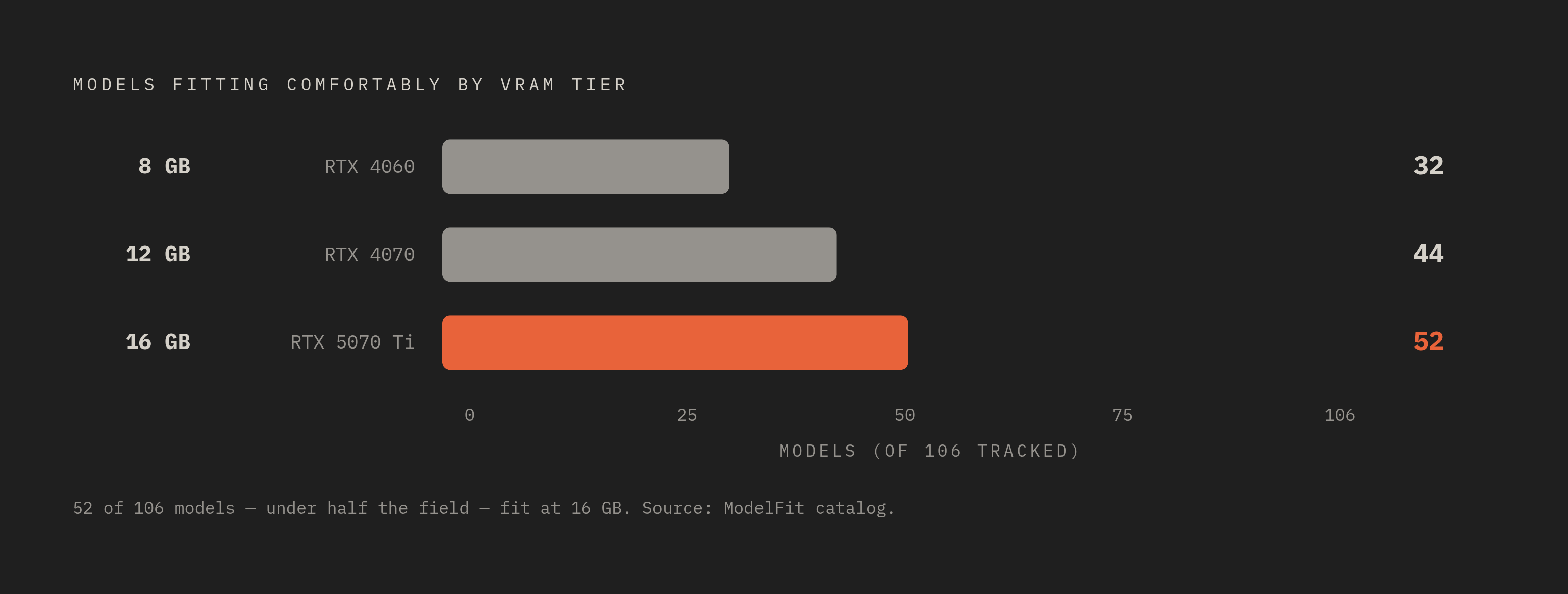
Among 106 tracked local models, 32 fit comfortably on 8 GB. What they do run, they run well: smaller models at Q4_K_M load comfortably, with enough headroom left for a reasonable context window. That's plenty for coding help, everyday chat, or a simple retrieval-augmented setup, genuinely productive work for one person running things locally.
Move to 16 to 24 GB and the field opens up considerably. This is the RTX 5070 Ti and 5080 at 16 GB, or the 4090 and 5090 at 24 to 32 GB. At 16 GB, 14B models at Q4_K_M fit with weights alone costing around 9 GB, leaving real room for context, and this tier starts reaching into larger models at the same quantization. At 24 GB, 32B dense models become comfortable: Qwen3 32B at Q4_K_M needs around 19 to 20 GB, and DeepSeek-R1-Distill-Qwen-32B is in about the same range. 70B models at Q4_K_M typically need around 40 GB, more than a single 24 GB card can hold at any context length worth using. That's a hard wall. It's a hard wall, and it matters before spending on a card expecting otherwise.
At 48 to 96 GB, single-GPU workstation territory starts making 70B models genuinely comfortable rather than a squeeze. The RTX PRO 6000 Blackwell, at 96 GB, is the only workstation card in this bracket with enough headroom to run Llama 3.3 70B at Q4_K_M with real KV cache room left over, and it also handles Llama 4 Scout at Q4_K_M on a single card. Scout has a MoE structure with a large total parameter count paired with a much smaller active count, where the Q4_K_M footprint is manageable on high-VRAM cards even though FP16 is out of reach for any single workstation. An H100 at 80 GB covers 70B models at Q4 with room to spare, fits at FP8 only with very tight margins, and handles Llama 4 Scout at Q4 with a similarly tight fit. A 70B model at FP8 requires roughly 70 GB of weights alone, leaving minimal KV cache headroom on an 80 GB H100, while Q4 requires only about 35 GB, and Llama 4 Scout at Q4_K_M needs roughly 55 to 69 GB including overhead, fitting a single H100 80 GB but with limited context headroom.
A dual RTX 5090 setup, pooling its combined VRAM, fits Llama 4 Scout at Q4_K_M and runs Llama 3.3 70B at Q4 with headroom to spare. Some reports put Llama 4 Scout at Q4_K_M with 8k context at roughly 68.8 GB, or about 65 GB by another estimate, both exceeding the 64 GB a dual RTX 5090 setup provides, while Llama 3.3 70B at Q4 needs around 43 GB, comfortably within that 64 GB budget. That's not just a capacity story. The advantage is architectural: the MLX framework, one of several runtimes available on the platform, paired with unified memory, makes this a genuinely different path from a discrete GPU paired with separate system RAM, not just a bigger number on a spec sheet.
At the far end sit the largest MoE models, the ones with total parameter counts that dwarf everything discussed so far. These need substantial VRAM scaled to their total size, and the largest publicly available ones push requirements into dual-high-end-workstation-GPU territory even at Q4_K_M. The entry tier consists of 8 GB VRAM, exemplified by the RTX 4060 and Intel Arc B580 priced at $300–500. There is a hard limit whereby larger models at useful context lengths will not fit without a significant CPU offload penalty.
System RAM, CPU, and the CPU-only fallback
Anyone running inference on a discrete GPU can mostly stop worrying about system RAM. It isn't the bottleneck. A modern 8-core CPU barely notices the load while the GPU does the actual work.
Where system RAM does matter is in setting a floor and a few upgrade thresholds. 16 GB is the bare minimum for running a 7B model alongside the usual development tools open at the same time. 32 GB of DDR5 is where most local AI builders should land, the setup that covers the large majority of realistic use cases without overspending. 64 GB opens the door to larger models on Apple Silicon and supports RAG workloads that are actually serious about it. Past 64 GB, the only reasons to keep climbing are CPU offload of very large models, fine-tuning work, or serving several models at once.
RAG deserves its own callout, because it breaks the usual assumption that RAM needs track model size. Running a local vector database like Chroma or Qdrant, alongside an embedding model and the LLM itself, against a large document corpus, pushes RAM demand up substantially, regardless of how small the LLM's own weights are. A RAG pipeline can easily need 64 GB or more even when the language model at its core would happily run in 16 GB on its own. The vector store and the embedding step are what eat the difference.
It works, and the honest caveat is throughput. The honest caveat is throughput: system memory bandwidth and CPU matrix performance sit well below what a GPU accelerator delivers for this kind of workload, so token generation slows down considerably. Where that trade-off actually makes sense is cost. Large pools of desktop or server RAM cost less per gigabyte than high-end VRAM, and for workloads where response time isn't the priority, batch jobs, offline generation, anything not waiting on a live conversation, that's a legitimate way to run larger models without buying a bigger card. There exist minimum and upgrade thresholds for system RAM. For CPU-only inference, llama.cpp supports CPU execution with memory-mapped model files, making surprisingly large quantized models runnable given enough system RAM.