Data Leakage Patterns in AI Assistant Plugins and Extensions
Three attack patterns exploit the gap between permissions users grant and behaviors they understand.
Data leakage through AI assistant plugins and extensions follows three compounding patterns, namely malicious harvesting, silent expansion by trusted tools, and prompt injection. Each exploits a gap between the access users grant and the behavior they understand. Learning how these patterns work is the prerequisite for deciding what to trust and auditing what is already installed.
Why the browser became AI's most dangerous attack surface
Email, internal applications, cloud services, and AI chat interfaces all run in the same browser session. That concentrates enterprise information in one place. Akamai's Enterprise AI Risk Report describes AI adoption moving from experimentation to structural mandate, with employees writing code, analyzing contracts, summarizing meetings, and automating tasks inside the browser. An extension that helps with those jobs sits close to both the source material and the conversation that comes from it.
The report identifies “AI power users” who share business information, upload files, and submit sensitive data far more than casual users. The heaviest extension users can therefore be the highest-value targets. Yet these tools do not receive the governance applied to other enterprise software. Microsoft Defender Security Research Team's 2026 research puts malicious AI-impersonating extensions at approximately 900,000 installs before detection, showing that official-store scanning is not a sufficient filter.
How does an extension get so close to sensitive work? Cloud Security Alliance AI Safety Initiative explains that access to browser state, page content, form inputs, authentication cookies, and keystrokes can come through permissions. Users routinely accept the install-time dialog without reviewing it. That consent is the starting point for all three patterns.
How the permission model turns a consent dialog into a standing authorization
The Chromium permission model grants access that persists after installation. It does impose a boundary on updates. When an update requests permissions beyond those already granted, the extension is disabled and requires re-consent. But changes in what it does within the original scope do not bring up another prompt, so the first authorization can cover things the user never expected.
The initiative describes what the individual permissions expose. The tabs permission reads URLs and tab metadata, while activeTab exposes the current page's full Document Object Model, or DOM. The scripting permission lets content scripts read and change page elements, and cookies gives them access to session tokens. These are different kinds of authority. Their combined reach determines what an extension can read, change, or take from an authorized browser context.
Akamai's report finds that most AI extensions ask for high or critical permissions, and they request cookie-access at nearly three times the rate for standard extensions. Some of that access helps the tool do its job, such as summarizing content, drafting responses, and navigating pages. Utility and exposure are therefore intertwined. Within the scope the user has granted, an extension can keep access across conversations and forms without asking for consent again. The initiative says conventional DLP, CASB, and EDR defenses have limited or no native visibility into this DOM-level behavior, while stolen data can leave over ordinary outbound HTTPS without a detectable perimeter anomaly.
Pattern one: malicious extensions that impersonate legitimate AI tools to harvest conversation data
OX Security's January 2026 findings on the campaign named two extensions built to harvest AI conversations [3][4][5][1][2][12]. “Chat GPT for Chrome with GPT-5, Claude Sonnet & DeepSeek AI” and “AI Sidebar with Deepseek, ChatGPT, Claude, and more” scraped complete conversation content from ChatGPT and DeepSeek interfaces and sent it to attacker-controlled domains. Their stated purpose concealed their actual collection. They claimed to gather only “anonymous, non-identifiable analytics”.
Microsoft's team found activity from the campaign across more than 20,000 enterprise tenants, where it collected full URLs and AI chat content. The attackers studied legitimate extensions such as AITOPIA to emulate familiar branding, permission prompts, and interaction patterns. Familiarity became part of the disguise. The team also observed agentic browsers automatically downloading the extensions without explicit user approval, adding a route to installation that did not depend on a person choosing the tool.
Unit 42 at Palo Alto Networks identified 18 high-risk AI-themed extensions, including tools that watched emails being composed, intercepted ChatGPT prompts, or exfiltrated passwords. Their methods included API interception, passive DOM observation, traffic proxying, and HTTPS response decryption. Unit 42 found heavier investment in exfiltration, credential theft, and content security policy bypass than in typical extension malware, as well as AI-generated code in multiple samples.
The theft can also reach development environments. LayerX researchers demonstrated in CursorJacking that a rogue browser extension could silently exfiltrate Cursor API keys by exploiting broad permissions, enabling developer impersonation and compromise of AI-driven development environments. This category starts with malicious intent. The sophistication of the harvesting is the main variable.
Pattern two: legitimate extensions that silently expand their data collection through automated updates
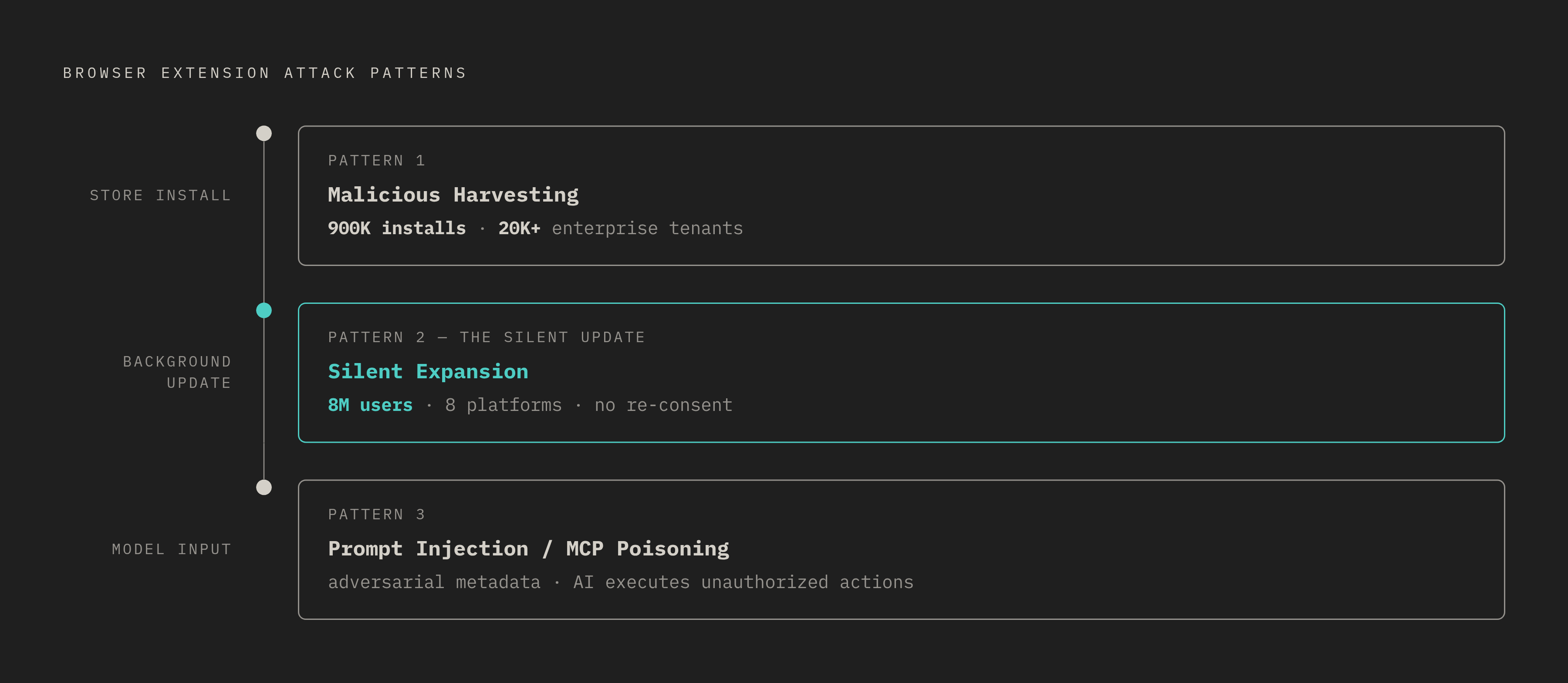
A trusted extension can cross that line later. The initiative describes Urban VPN Proxy introducing interception code in version 5.5.0 in July 2025. Across that extension and seven related extensions from the same publisher, the collection affected more than 8 million users on Chrome and Edge. It harvested AI conversations and sold them to advertisers without meaningful re-consent from existing users. The affected platforms were ChatGPT, Claude, Gemini, Microsoft Copilot, Perplexity, DeepSeek, Grok, and Meta AI.
The delivery mechanism was an ordinary background update. No newly requested permission was needed to make previously authorized access serve a different purpose. Users may never learn that an update has changed what the code does and expanded what it collects under the same permissions.
Could a user simply turn the collection off? Microsoft's team described a misleading consent mechanism in which harvesting was hardcoded, ran continuously regardless of extension settings, and offered no option to disable it. Full uninstallation was the only recourse. A tool can still provide genuine value under those conditions, making removal a harder decision than it would be for obvious malware. Its identity also stays the same. A blocklist of known-malicious extensions therefore cannot reliably catch a trusted tool that changes after deployment.
Pattern three: prompt injection and MCP tool poisoning that turn the AI's own reasoning against the user
Prompt injection attacks the model's reasoning. The attack arrives as input the assistant reads. Cato CTRL's HashJack disclosure describes adversarial instructions embedded in URL hash fragments. When an AI browser assistant reads a crafted fragment, it may follow instructions to exfiltrate data, conduct phishing, or compromise credentials without a vulnerability in the extension itself.
MCP tool poisoning moves that deception into tool descriptions. Ordinary prompt injection can arrive in user-supplied text, where many systems apply scanning, but tool metadata appears to come from a trusted system developer. The initiative explains that models consume these descriptions even though users rarely see them at runtime. Hidden instructions can direct unauthorized actions, data exfiltration, or suppression of notifications. This makes the attack look like a supply-chain compromise of the context the agent uses.
Agentic tools add another boundary, between taking in context and running code. Adversa AI's May 2026 “TrustFall” disclosure found that Claude Code, Cursor CLI, Gemini CLI, and GitHub Copilot CLI auto-executed project-defined MCP servers after folder trust was accepted. All four defaulted to an affirmative response. One Enter key could spawn an attacker-controlled process with the developer's full OS privileges.
The June 2026 Miasma Worm planted adversarial MCP configuration files across 73 GitHub repositories, including Microsoft Azure's azure/durabletask project. Opening an affected repository in a vulnerable IDE executed a credential-harvesting payload without warning. Socket's research team also documented the February 2026 SANDWORM_MODE npm campaign under aliases official334 and javaorg. Its McpInject module harvested LLM API keys for nine providers, including OpenAI, Anthropic, Google, Groq, Together, Fireworks, Replicate, Mistral, and Cohere. For developers, exposure thus extends beyond browser content into repository configuration and executable dependencies.
How the three patterns compound rather than operate independently
The patterns differ in where deception enters. Their effects need not stay at that layer. A malicious extension with access to page content can inject adversarial instructions into an AI session without making them visible to the user. What begins as permission abuse can become prompt injection, using the assistant to act on content the extension supplied.
A trusted extension changed through an update can hold the same authority as one built for theft from the start. Its established identity does not restrict the updated code to its former purpose. Akamai's report presents CometJacking as an example of the compound risk, with attackers targeting the assistant and using extension access to manipulate AI outputs the user has no reason to suspect.
This does not make every prompt injection a browser-permission exploit. Broad authority that stays in place gives injected instructions access to abuse, while hidden behavior makes that abuse hard to see. Most organizations have no policies specifically for how they get browser extensions, review their permissions, and handle their data. That governance gap lets the patterns coexist across the same fleet. Treating them as separate incidents overlooks how granted access, changes to code, and the context an agent trusts are linked.
What is actually at stake when these patterns run undetected in enterprise environments
Microsoft's team found proprietary code, internal workflows, and strategic discussions in the data that was collected. Employees submit this material because they treat AI as a thinking partner. Losing that data can expose both business assets and the thinking behind decisions.
The consequences also depend on the work involved. In financial services, stolen conversations put confidential financial workflows at risk, while healthcare conversations that hold patient data carry a risk of HIPAA violations. When employees submit enterprise records or customer PII to public third-party tools, the organization risks an immediate regulatory breach. Without customized commercial contracts forbidding vendor ingestion, proprietary assets can enter external training sets and create unauthorized third-party disclosure under GDPR cybersecurity obligations.
The exposure is not confined to browser stores. Antiy CERT identified 1,184 malicious skills across the ClawHub marketplace for the OpenClaw AI agent framework. That finding shows why audits need to cover the wider AI tool supply chain, where plugins and integrations can bring risks that a list of extensions would miss.
How to audit what is already installed and make informed decisions about what to trust
Inventory every installed extension and classify it by its permission set. The combination of scripting, activeTab, and cookies warrants immediate review because it joins page access and modification with access to session tokens. The initiative recommends putting AI-capable extensions in their own risk tier, using an allowlist to control what can be installed, auditing each extension's permissions, and linking these controls to enterprise browser management platforms.
Next, examine what trusted extensions have become. Version history and changelog review are needed because the silent-update pattern can keep an extension's identity the same while changing what it does. Unit 42 recommends sourcing extensions from trusted providers and applying least privilege. A mismatch between requested permissions and the stated function is itself a signal, even when the tool appears useful.
For agentic workflows, extend that review beyond browser permissions. Review which MCP servers auto-execute when a project or folder opens, and scrutinize project-defined configurations from external repositories as executable dependencies. Teams building AI-augmented workflows should also include the plugins and integrations layered on their assistants, rather than assuming browser extension management covers them.
Finally, record the lack of rules for extensions as an audit finding. Without policies for procurement, permission review, and data handling, extensions are trusted by default. Understanding the three patterns makes an informed audit possible, but acting on its findings requires organizational policy.